StrataMail VPS Configurator
Configure Your VPS Email Hosting
Select your VPS hardware and spam filtering. For hybrid routing or email parsing, configure those separately after completing this step.
🎯 Recommended Configuration
Note: Storage is always calculated from your user count and storage per user, regardless of CPU/RAM selection above.
📋 Need Additional Services?
Configure these separately after completing your VPS setup:
🔀 Hybrid Email Routing 🤖 Email Parsing & AutomationUnderstanding VPS Email Hosting
What is a VPS?
A Virtual Private Server (VPS) gives you dedicated resources—CPU cores, RAM, and storage—on enterprise-grade hardware without the cost and commitment of a full dedicated server. Think of it as your own isolated email server with guaranteed performance, running on professional infrastructure with redundant power, network connectivity, and backup systems.
Unlike shared hosting where hundreds of accounts compete for the same resources (causing the "noisy neighbor" problem where other users' activity slows down your email), VPS provides guaranteed resource allocation. Your allocated CPU cores, RAM, and storage are yours alone—no sharing, no performance degradation when other customers on the same physical hardware experience traffic spikes.
Why VPS Instead of Shared Hosting?
Guaranteed Performance: Shared hosting divides resources among hundreds of users. When those users send mass emails, process large attachments, or experience email storms, everyone on the shared server slows down. With VPS, your resources are isolated and guaranteed—your email performance is independent of other customers' activity.
Dedicated Processing Power: Your CPU cores handle only your email traffic. During peak times when everyone checks email simultaneously, your server has guaranteed processing power for IMAP connections, spam filtering, virus scanning, and message delivery. No waiting in queue behind other customers' email processing.
Control Over Updates and Services: You decide when updates happen, what services run, and how resources are allocated. Need to schedule maintenance during your off-hours? Done. Want to run webmail with specific plugins? Configured. Need custom spam filtering rules? Implemented. This level of control is impossible with shared hosting where everyone shares the same standardized configuration.
When to Choose VPS Email Hosting
User Count (25-600 users): This is the VPS sweet spot. Below 25 users, shared hosting is more cost-effective. Above 600 users, dedicated servers provide better performance. Between 25-600 users, VPS delivers the ideal balance of performance, control, and cost.
Custom Configuration Requirements: Your organization has specific email requirements that can't be met with shared hosting's standardized configuration. Examples: custom spam filtering rules beyond basic settings, specialized IMAP configurations, integration with proprietary authentication systems, custom webmail branding, or specialized delivery policies for compliance.
White-Label Hosting Needs: MSPs, IT service providers, and agencies need white-label capabilities—providing email hosting under their own brand without revealing the underlying infrastructure provider.
When NOT to Choose VPS
Under 25 users: Shared hosting is more cost-effective and requires less management overhead. Unless you have specific requirements that demand VPS (custom configuration, white-label needs), shared hosting serves small organizations perfectly well.
Over 600 users: Dedicated servers become more cost-effective at this scale. The performance per dollar improves dramatically, I/O capacity is significantly better, and you avoid the performance ceiling inherent in virtualized environments.
Understanding Server Resources
Why User Count Drives Resource Requirements
Email servers handle multiple simultaneous operations: incoming SMTP connections from sending servers, IMAP and POP3 sessions for users checking mail, webmail interface logins, virus scanning of attachments, spam filtering analysis, and outbound message delivery. Each active user creates several concurrent processes running on your server.
During peak times—morning when everyone checks email after arriving at work, lunch hour when people catch up on messages, and end of business day when final communications happen—a 250-user organization can easily generate 200+ simultaneous IMAP sessions, dozens of concurrent webmail logins, and continuous SMTP traffic as messages flow in and out.
CPU (Processing Power)
How CPU affects email performance: Each vCPU core handles approximately 30-40 concurrent connections before performance degrades. When users connect via IMAP to check email, log into webmail, or send/receive messages, each action consumes CPU cycles. Spam filtering and virus scanning are particularly CPU-intensive operations—analyzing message content, checking sender reputation, scanning attachments, and applying filtering rules all require processing power.
Real-world scaling:
- 1 vCPU (up to 50 users): Suitable for small offices where not everyone uses email heavily. Handles typical small business email volume with moderate concurrent usage.
- 2 vCPU (51-100 users): Handles regular business email loads with multiple departments checking email throughout the day. Sufficient CPU headroom for virus scanning and spam filtering without impacting delivery performance.
- 4 vCPU (101-200 users): Moderate email loads with significant concurrent usage. Handles situations where many users access email simultaneously without performance degradation.
- 6 vCPU (201-400 users): Heavy email usage with constant activity throughout business hours. Handles organizations where email is the primary communication method.
- 8 vCPU (401-600 users): Very heavy processing loads, large organizations, or companies processing thousands of automated messages daily.
RAM (Memory)
How RAM affects email performance: Email servers cache frequently accessed messages in memory for fast retrieval, maintain connection state for every active IMAP/POP session, buffer outgoing mail in memory queues before delivery, and load virus/spam filtering databases into RAM for fast scanning. More RAM means better caching, which dramatically improves user experience—messages load instantly instead of being read from disk every time.
Real-world guidelines:
- 1 GB (up to 50 users): Minimum for small business email. Handles basic IMAP connections and webmail access with modest caching.
- 2 GB (51-100 users): Better caching performance with headroom for concurrent connections.
- 4 GB (101-200 users): Good caching performance, handles scenarios where users keep email clients open all day with persistent IMAP connections.
- 8 GB (201-400 users): Excellent caching performance, handles heavy concurrent usage.
- 12-16 GB (401-600+ users): Heavy caching needs, very high concurrent usage, or organizations running additional services.
Storage Capacity and Usage Patterns
Beyond mailbox storage: Total storage requirements include not just mailbox data, but also mail queues (outbound messages waiting for delivery), server logs (debugging and security monitoring), spam quarantine (messages held for review), virus scanning databases, and system overhead. Plan for 20-30% overhead beyond pure mailbox storage.
User storage patterns:
Light Users (2-5 GB per user): Text-heavy email with minimal attachments. Typical for support ticketing systems, notification-only accounts, or users who archive to local storage. Industries: retail staff, field service technicians, manufacturing floor supervisors.
Standard Users (10-15 GB per user): Normal business email with moderate attachments. Most office workers fall into this category—daily email with occasional PDFs, spreadsheets, and documents. Industries: standard office environments, professional services.
Heavy Users (25-50 GB per user): Graphics designers receiving high-resolution files, executives with years of archived correspondence, sales teams with extensive client communication history. Industries: design agencies, executive management, sales organizations.
Power Users (50+ GB per user): Video production teams, architectural firms exchanging CAD files, users who maintain 10+ years of message history. At this storage level, consider whether email is the right tool—file sharing platforms are designed for large file collaboration.
Email Security Options Explained
Understanding Spam Filtering Tiers
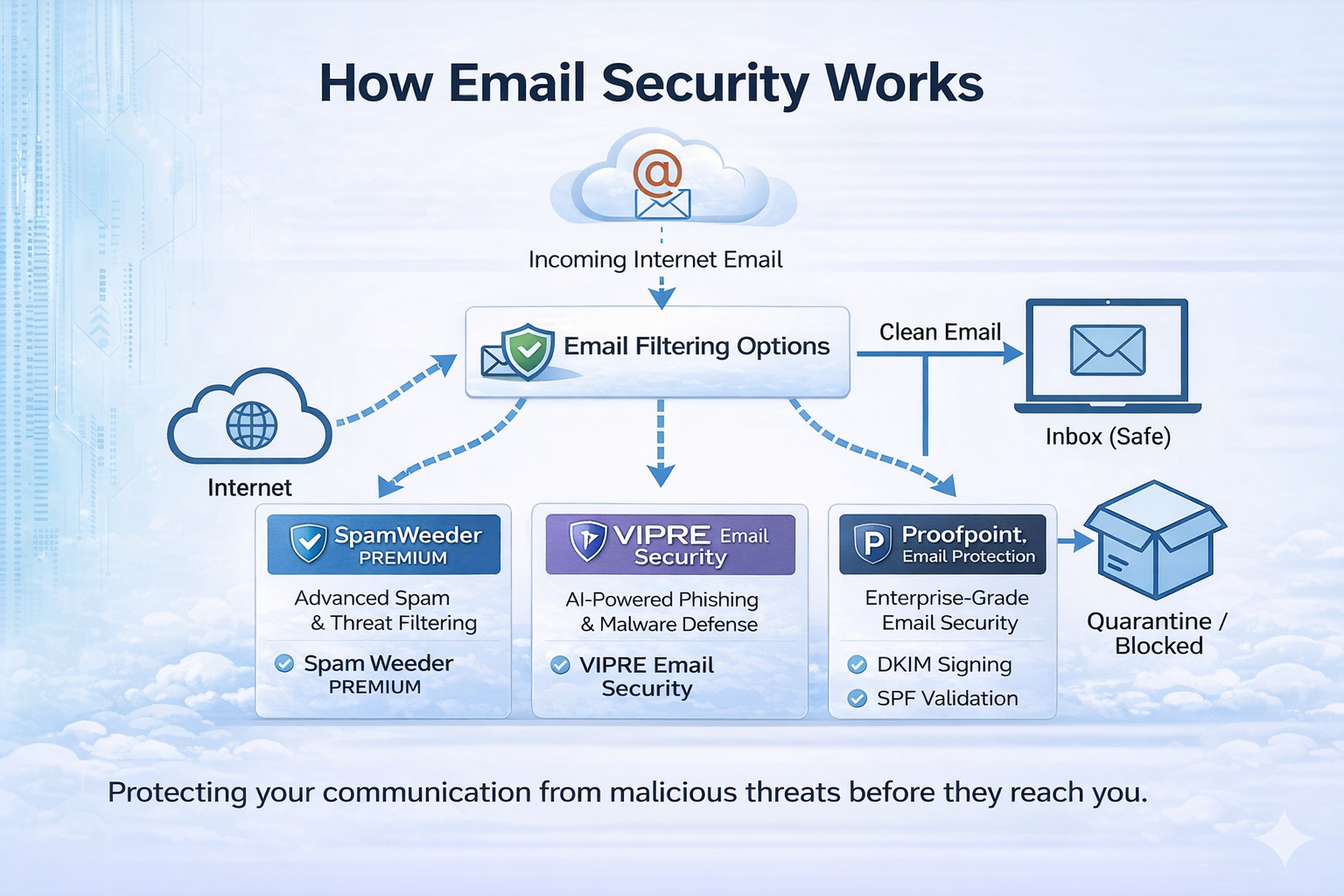
All StrataMail hosting includes basic spam filtering at no extra cost—it catches obvious spam and known malware. But modern email threats are sophisticated: targeted phishing, business email compromise (BEC), zero-day malware, and social engineering attacks that bypass traditional filters.
The pricing model matters: Domain-based filtering (SpamWeeder) charges per domain regardless of user count. Per-user filtering (VIPRE, Proofpoint) scales linearly with users and provides individual-level protection.
Basic Filtering (Included - $0)
WHAT: Built-in SpamAssassin with RBL checking, greylisting, and known malware signatures.
WHY: Catches 90-95% of obvious spam (viagra ads, Nigerian princes, lottery scams) and known viruses. Suitable for low-risk environments or as a baseline layer.
WHEN TO CHOOSE: Small teams with tech-savvy users who can spot phishing attempts, low-value targets where risk is minimal, or when budget is extremely constrained. Not recommended for healthcare, finance, legal, or any industry handling sensitive data.
SpamWeeder Premium
WHAT: Cloud-based filtering with 4-day message spooling, white-label administration portal, and domain-level pricing. Each domain license covers up to 25 users.
WHY: Best for MSPs and resellers needing white-label capabilities. If you have 3 departments on separate domains, you pay for 3 domains rather than per-user fees—massive savings if some domains have many users.
The 4-day message spooling is critical for business continuity: if your mail server goes down for maintenance, hardware failure, or network issues, messages queue in SpamWeeder's cloud infrastructure and deliver automatically when you're back online. No messages lost, no manual intervention, no customer awareness of the outage.
WHEN TO CHOOSE: Multi-domain organizations, resellers needing branded filtering portals for clients, or companies where user counts vary significantly across domains. Perfect for MSPs managing multiple client domains who want consistent filtering with per-client branding.
VIPRE Email Security
WHAT: AI-powered email security with real-time phishing detection, URL rewriting, malware sandboxing, and per-user protection. Includes email encryption and data loss prevention.
WHY: Modern phishing attacks are targeted and personalized. VIPRE's AI analyzes sender behavior, email content patterns, and link destinations in real-time.
URL rewriting is the killer feature: when an email arrives, VIPRE rewrites all URLs to pass through its scanning gateway. Even if a link was completely safe when the email was sent, VIPRE re-checks it every single time the user clicks—catching websites that became malicious hours or days after delivery.
Malware sandboxing detonates suspicious attachments in isolated virtual environments before they reach users. Zero-day malware that has never been seen before gets blocked based on behavior, not signatures.
WHEN TO CHOOSE: Organizations concerned about business email compromise (BEC), companies handling financial transactions via email, or industries with compliance requirements. Per-user pricing makes it cost-effective for medium-sized deployments (50-300 users).
Proofpoint Essentials
WHAT: Enterprise-grade threat protection with advanced threat intelligence, email archiving, business continuity, and comprehensive compliance tools. Includes TAP sandboxing and executive protection.
WHY: Proofpoint analyzes billions of emails daily across their entire customer base, building threat intelligence that protects against zero-day attacks before signatures even exist.
Email archiving provides litigation-ready storage with tamper-proof logging and e-discovery tools. Every message is indexed and searchable with granular retention policies.
Business continuity means users can send and receive email even if your mail server is completely offline. Proofpoint maintains a live replica of your environment.
WHEN TO CHOOSE: Healthcare (HIPAA), finance (SOX, FINRA), legal firms (archiving), government contractors, or any organization facing sophisticated threat actors. Mandatory for industries with strict email retention and e-discovery requirements.
ROI JUSTIFICATION: According to FBI IC3 reports, the average BEC attack costs companies $120,000. One prevented attack pays for 3-5 years of Proofpoint protection for a 50-user organization.
Email Security Filtering Diagram
This diagram shows how email flows through spam filtering layers before reaching your mailbox, protecting against threats at each stage.
Hybrid Email Routing Explained
What is Hybrid Email Routing?
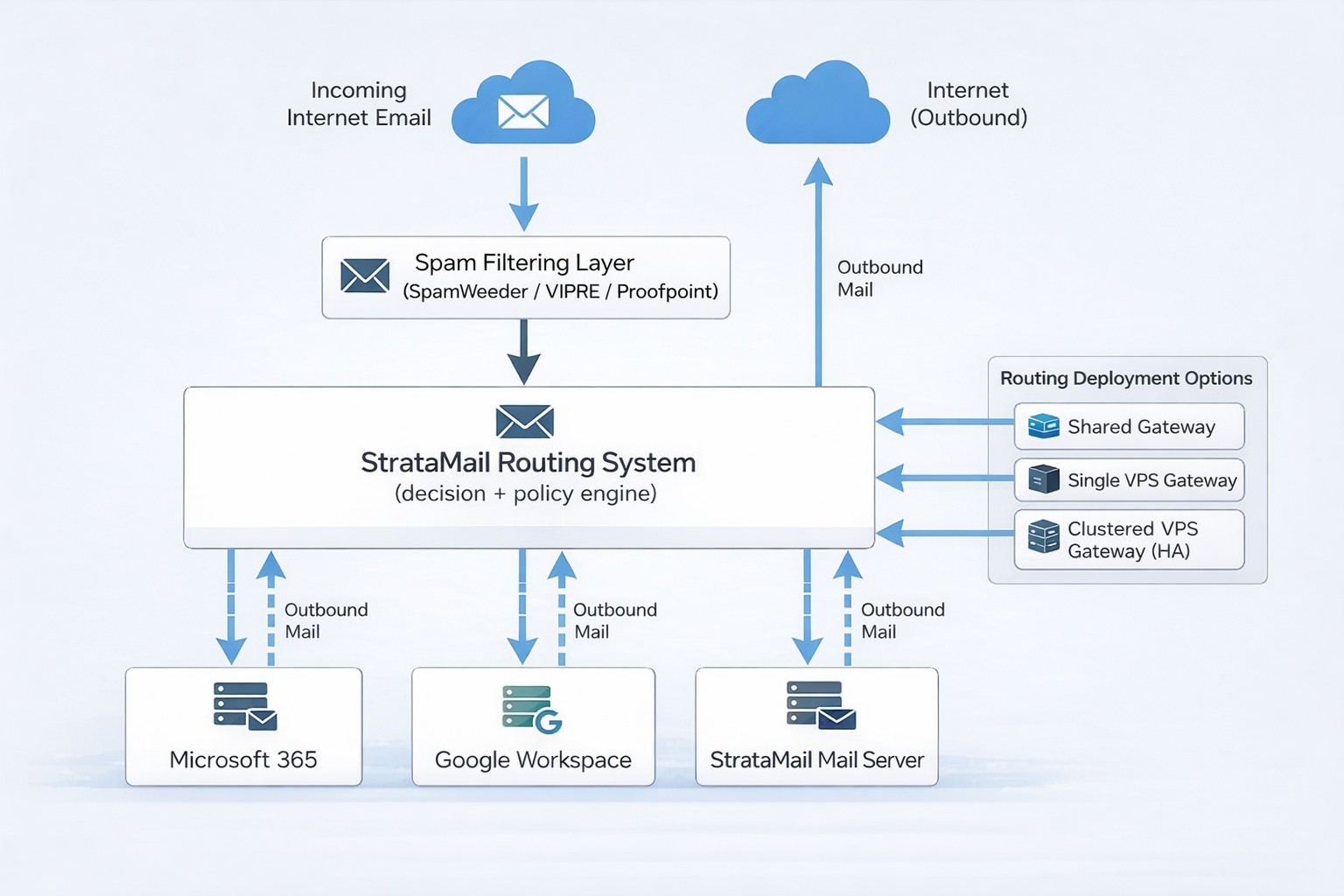
Hybrid routing allows you to run some users on StrataMail while others use Microsoft 365, Google Workspace, or on-premise Exchange—all under the same domain. Instead of everyone@yourcompany.com being on one platform, sales@yourcompany.com routes to M365, support@yourcompany.com routes to StrataMail, and legacy@yourcompany.com routes to your on-premise server.
The StrataMail Routing Cloud sits between the internet and your mail servers, intelligently directing inbound and outbound email for yourcompany.com users to the appropriate destination based on where each mailbox actually lives.
How It Works
1. Routing Cloud receives all inbound mail: Your domain's MX records point to the StrataMail Routing Cloud gateway, so all incoming email passes through this central routing point.
2. Checks routing table: For each incoming message, the gateway consults a routing table that maps email addresses to their actual mailbox locations (Microsoft 365, Google Workspace, StrataMail VPS, on-premise Exchange, etc.).
3. Delivers to appropriate backend: The message is delivered to the platform where that specific user's mailbox lives. The routing is completely transparent to the sender.
4. Handles technical details: The gateway manages MX records, SPF/DKIM signing, message filtering, compliance journaling, and delivery policies.
Common Use Cases
M365 Cost Reduction: Keep executives on Microsoft 365 for Teams integration and SharePoint, while moving general staff to StrataMail VPS. This saves 60-70% on licensing costs. Example: 10 M365 seats for leadership + 40 StrataMail seats for staff = $205/mo total vs $625/mo for 50 M365 seats.
Migration Safety: Gradually migrate users from on-premise Exchange to cloud email without a high-risk "big bang" cutover. Move pilot groups first, verify functionality, then migrate additional departments incrementally.
Compliance Separation: Route compliance-regulated users through platforms with built-in archiving and retention, while regular users stay on standard email hosting.
White-Label Reselling: MSPs can offer email services on their own branded infrastructure while selectively leveraging Microsoft 365 or Google Workspace for clients who need those specific ecosystem features.
Not Needed ($0/month)
WHAT: All users hosted exclusively on StrataMail VPS. Simple, single-platform deployment.
WHY: No routing infrastructure overhead, no additional points of failure, straightforward troubleshooting.
WHEN TO CHOOSE: Pure StrataMail deployments, new companies without legacy email infrastructure.
Shared Routing Gateway
WHAT: Cloud-based routing gateway on shared infrastructure. You define routing rules via web interface.
WHY: Cost-effective entry point for basic split-domain needs. Handles straightforward scenarios like "These 10 users go to M365, everyone else to StrataMail."
WHEN TO CHOOSE: Simple two-platform scenarios (StrataMail + one external platform), limited customization needs, or budget-conscious deployments. Not suitable for white-label reselling or complex routing rules.
Dedicated VPS Gateway
WHAT: Isolated VPS running Postfix routing gateway with dedicated IP addresses and full administrative access. White-label capable.
WHY: Complete control over routing logic and mail flow. You can implement custom rule sets, integrate with APIs, customize filtering, and maintain full shell access. Your own dedicated IPs mean you control sender reputation.
WHEN TO CHOOSE: MSPs reselling email services who need white-label capabilities, companies with complex routing requirements (3+ backend platforms), organizations needing custom integration with proprietary systems, or situations where sender IP reputation is critical.
Hybrid Email Routing Diagram
This diagram illustrates how the StrataMail Routing Cloud intelligently directs email to different platforms (M365, Google, StrataMail) based on where each user's mailbox lives.
Email Parsing & Automation Explained
What is Email Parsing?
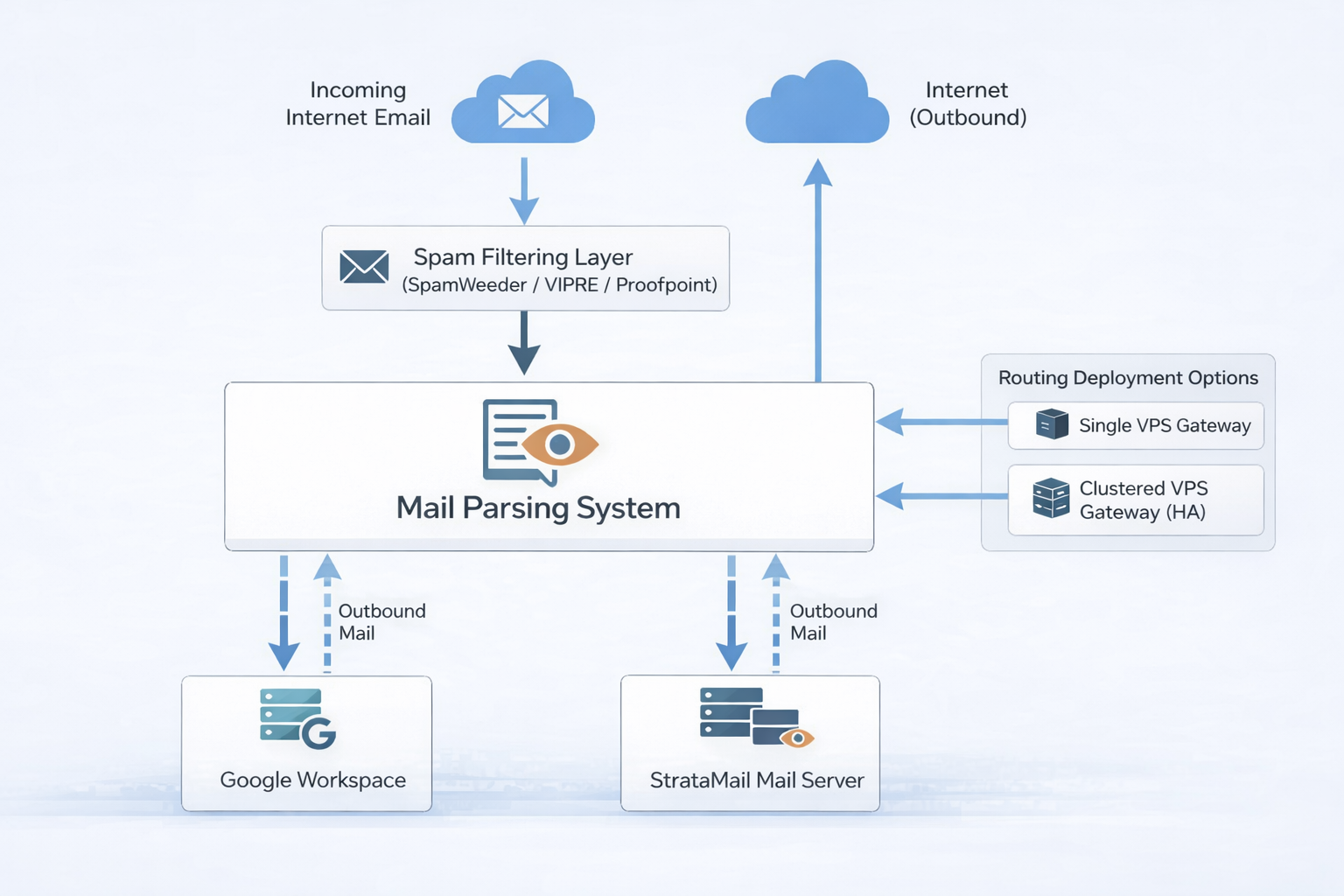
Email parsing automatically extracts structured data from incoming emails and triggers workflows. Instead of manually processing order confirmations, support tickets, or data submissions, AI-powered parsing reads emails and automatically creates records, updates databases, or triggers business processes.
How It Works
1. Email arrives: Incoming message hits your parsing rules (e.g., orders@yourcompany.com)
2. AI extraction: Local LLM or n8n workflows extract key data (order number, customer info, line items, totals)
3. Action triggers: Extracted data creates database records, updates spreadsheets, generates tickets, or notifies team members
4. Response automation: Optionally send confirmation emails with extracted data
Common Use Cases
Order Processing: Parse order confirmation emails from suppliers or customers. Extract product SKUs, quantities, prices, and shipping details. Automatically update inventory systems or create purchase orders.
Support Ticket Creation: Parse support requests sent to specific addresses. Extract customer details, issue descriptions, and priority indicators. Auto-create tickets in your helpdesk system with proper categorization.
Lead Capture: Parse contact form submissions or inquiry emails. Extract names, companies, phone numbers, and specific requirements. Feed directly into CRM with proper lead scoring.
Invoice Processing: Parse vendor invoices received via email. Extract invoice numbers, amounts, due dates, and line items. Route to accounting software for approval workflows.
Available Options
Shared Parsing Rules: Use predefined parsing templates for common scenarios (orders, contacts, invoices). Cost-effective for standard use cases with typical email formats.
Split Domain Parsing VPS: Dedicated parsing infrastructure for organizations using hybrid routing. Processes emails from multiple platforms (M365, Google, StrataMail) with unified parsing rules.
Customized Parsing VPS: Fully customized parsing logic developed specifically for your unique email formats and workflows. Includes custom AI training for your specific data extraction needs and proprietary business logic integration.
Privacy & Data Sovereignty
All email parsing uses local LLM processing on your VPS infrastructure. Your email data never leaves your server, never goes to third-party AI services, and maintains complete privacy compliance. Ideal for healthcare, legal, financial, or any industry with strict data handling requirements.
Email Parsing Workflow Diagram
This diagram shows how incoming emails are automatically parsed, data extracted, and workflows triggered - all using local LLM processing on your infrastructure.