Discovery: Scoping Your Parsing & Routing Deployment
Before StrataMail can route your traffic intelligently, we need a clear, agreed picture of how your operation works. That is the Discovery phase — a short, structured engagement that turns your inbox ownership, your categories, and the lookups that resolve the hard cases into a configuration blueprint the build is scoped from. We start from who owns the work, not from reverse-engineering legacy code.
Migrating From a Legacy Classification System
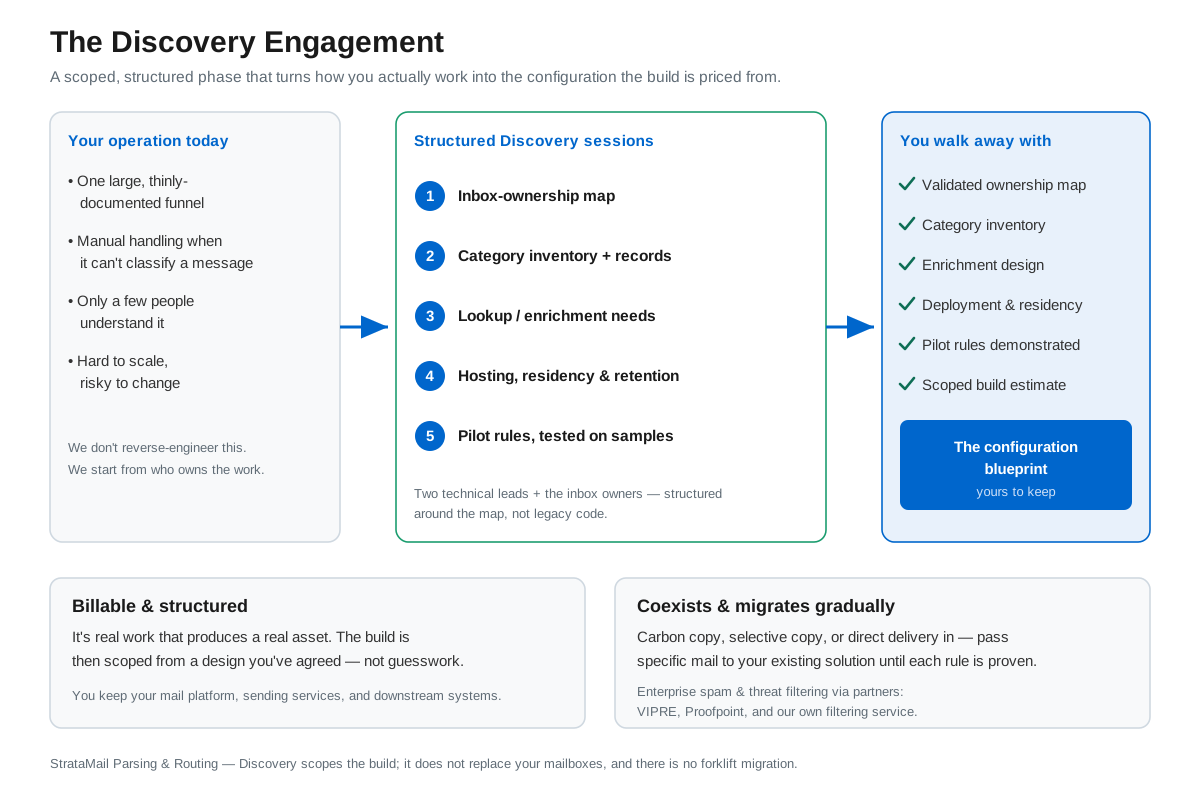
Many organizations arrive here with a legacy email classification or routing system — one large funnel of hard-coded logic, thinly documented, that only the original developers fully understand. The platform is configured around what you already have, so the migration is a mapping exercise, not a rebuild:
| What you have today | What it becomes here |
|---|---|
| One large classification "funnel," thinly documented | A set of named, readable rules — each one visible, testable, and owned |
| Categories / destination operators (claims, recoveries, invoices...) | One routing rule per category: conditions → tag/copy → deliver to that team's queue |
| Inbox ownership spreadsheets ("who owns what") | Rule scoping: per inbox, per domain, per person — ownership is the configuration |
| Sender/recipient-driven sorting logic | First-class conditions on sender, recipient, and direction — no parsing tricks needed |
| Database lookups when the system "can't work it out" | An automation hand-off step: query your system of record, then route on the answer |
| Hard-coded logic only the original developers understand | Plain-English rule summaries anyone can audit; a built-in tester for safe changes |
| Big-bang cutover risk | Inbox-by-inbox migration: run in parallel with the legacy funnel, compare, then widen |
What Discovery Looks Like
We deliberately do not start by reverse-engineering legacy code. The faster, cleaner path runs through the people who own the work:
- Inbox ownership map. The addresses, who owns each, what arrives there, and where it must land. Your operations staff usually know this better than any document.
- Category inventory. The destination categories the work must reach, and the record each must create downstream.
- Lookup needs. The cases where routing depends on data in another system, so the enrichment steps are designed up front.
- Constraints. Hosting requirements (your cloud, a private instance, or our hosting), data residency, and retention periods — the deployment is configured to your policy, including fully private processing where message content never leaves your infrastructure.
- Pilot rules. We configure one or two inboxes' worth of rules, your team tests them against real sample messages in the built-in Rules Tester, and we expand from what works.
Two technical leads on your side plus the inbox owners are typically all that discovery requires; sessions are structured around the ownership map, not around legacy code walkthroughs. Discovery converts the items above into the configuration blueprint the build is scoped from: the validated inbox-ownership map, the category inventory with its downstream records, the enrichment design, documented deployment and data-residency decisions, and pilot rules demonstrated against your real sample messages — so your team sees the routing behave before anything goes live.
To prepare, expect us to ask: which inboxes and addresses are in scope, and who owns each? What are the destination categories, and what record must each create? When the current system cannot classify something, what happens — and what data would have resolved it? Which systems must the solution feed or query? Where must the data live, and how long must it be kept?
Send us your inbox-ownership map ahead of the first session and we will arrive with draft rules already written against it.
Why Discovery is a paid, structured engagement: it isn't a sales call — it's real work that produces a real asset. You walk away with a configuration blueprint your organization keeps, a build de-risked by being scoped from clarity rather than guesswork, and pilot rules demonstrated against your own sample messages before anything goes live.
You don't switch everything at once
StrataMail coexists with what you run today and takes over gradually. Two simple ways to feed it: your existing gateway sends a carbon copy (or a selective copy of just the mail in scope) to StrataMail, or mail is delivered to StrataMail directly and we route it onward by your rules. While we build the rule that replaces a given workflow, those specific messages can pass straight through to your existing parsing or processing solution — so it keeps working until its replacement is proven. You migrate one inbox or category at a time, running old and new side by side.
Enterprise spam & threat filtering, where you need it
Classification works best on mail worth classifying. Enterprise-grade spam and threat filtering can sit ahead of your routing rules — through our own filtering service and partnerships with leading providers including VIPRE and Proofpoint. If you already run a cloud-based filter, it can be used instead.
Next step
Talk to us about Email Intelligence
Describe Your Challenge Schedule a CallOr call 866.790.4678
Tell us about your Email Intelligence needs
Describe your situation and we will look into it and get back to you.
Describe Your Challenge Schedule a Call