Migrating Microsoft 365 Tenants? Don't Lose Mail During the Cutover.
DNS propagation during a Microsoft 365 tenant-to-tenant migration can take hours — sometimes days. During that window, inbound mail can land at the wrong tenant, get deferred, or bounce entirely. StrataMail captures all of it, regardless of DNS state, so nothing is lost during your migration window. Users access continuity webmail throughout the cutover so they are never locked out of email.
The Problem with M365 Tenant Migrations
Tenant-to-tenant migrations are common in mergers, acquisitions, domain consolidations, and rebranding scenarios. The migration tools — BitTitan MigrationWiz, Quest On Demand Migration, and Microsoft's native cross-tenant migration — handle mailbox data. None of them clearly protect inbound mail during the DNS propagation window.
- MX record changes during cutover require DNS propagation — 15 minutes to 48 hours depending on TTL settings and resolver caching
- During propagation, inbound mail may route to the old tenant, the new tenant, or neither — unpredictably
- Microsoft's own documentation recommends using an MX backup service during cutover if losing mail is unacceptable
- Users lose email access during the cutover window — a serious business continuity risk for live migrations
- IT teams have no visibility into what mail arrived, where it went, or whether it was lost
How StrataMail Solves It
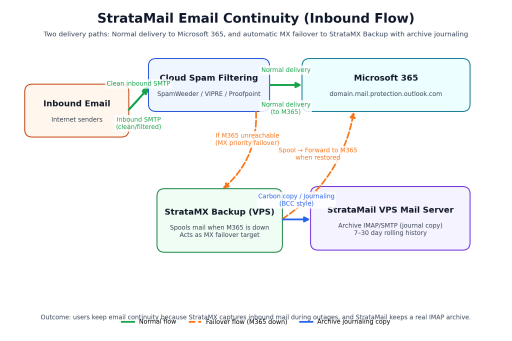
StrataMail is provisioned before the cutover begins — typically 24 to 48 hours in advance. During the migration window, it acts as a neutral catch-all MX, capturing all inbound mail regardless of DNS state. Dual delivery gives users access to continuity webmail throughout the migration so they are never locked out. After cutover stabilizes, queued mail is released to the new tenant and StrataMail is deprovisioned.
StrataMail accepts mail for the domain regardless of which tenant DNS is currently resolving to. No mail is lost during the propagation window.
Inbound mail is simultaneously stored locally (continuity webmail) and queued for relay. Users can read and reply throughout the migration window.
Queue depth, delivery status, and event log visible in the admin dashboard throughout the migration. You know exactly what arrived and when.
Once the new tenant is ready, StrataMail releases all queued mail automatically. 5-minute retry interval. No manual steps.
Mail held for up to 30 days before expiry. Even extended migration windows are covered.
StrataMail is not a replacement for BitTitan, Quest, or native Microsoft cross-tenant migration. It is the safety net underneath them, covering what they do not.
The Problem vs. The StrataMail Solution
| The Problem | The StrataMail Solution |
|---|---|
| DNS propagation during M365 cutover takes hours — sometimes days | StrataMail acts as a neutral catch-all MX during the propagation window |
| Mail arrives at the wrong tenant, gets bounced or lost | All mail is captured by StrataMail regardless of DNS state |
| Migration tools handle mailbox data but not inbound mail safety | StrataMail fills the gap — it is the safety net under the migration |
| Users lose email access during the cutover window | Dual delivery gives users webmail access to continuity mailbox throughout the migration |
| IT team has no visibility into what mail arrived during the window | Admin panel shows queue depth, delivery status, and event log in real time |
What This Engagement Includes
| Phase | What We Do | Timing |
|---|---|---|
| Assessment & scoping | Review migration plan, DNS configuration, mailbox count, and cutover schedule. Deliver written migration brief and StrataMail configuration plan. | 1–2 weeks before cutover |
| Pre-provisioning | Configure StrataMail for the domain(s), test MX routing, verify dual delivery to continuity webmail. | 24–48 hours before cutover |
| Cutover support | Monitor StrataMail during the migration window, verify queue health, coordinate with migration team on DNS timing. | During cutover window |
| Release & deprovision | Verify all queued mail delivered to new tenant. Remove StrataMail from MX configuration. | After cutover stabilizes |
Pricing
| Engagement | Price |
|---|---|
| Assessment & scoping (up to 5 hours — credited to execution) | $875 flat |
| Execution — per 100 mailboxes | $1,500 |
| Normal hours consulting | $195 / hour |
| After hours consulting (6 PM – midnight; weekends) | $325 / hour |
| Red-eye / emergency consulting (midnight – 8 AM; holidays) | $600 / hour |
The $875 assessment fee is credited toward the execution engagement if the customer proceeds. Execution engagements are scoped after an initial assessment. Overrun billing is in 1-hour increments beyond agreed scope. All consulting billed in 1-hour minimums.
Why Not Just Use BitTitan or Quest?
Migration tools handle mailbox data movement. They do not protect inbound mail during DNS propagation. StrataMail is not a replacement for migration tools — it is the safety net underneath them. Most migration projects use StrataMail alongside BitTitan or Quest, not instead of them. The two solve different problems: migration tools move your existing mail data; StrataMail catches the mail that arrives while your MX is in flux.
MSPs and IT Consultants: Add This to Every M365 Migration Engagement
If you handle Microsoft 365 tenant-to-tenant migrations for clients, StrataMail is a billable add-on that protects your reputation and your clients' mail simultaneously. No competitor is clearly marketing this service. You can offer it under your own brand as part of your migration methodology.
This is also available through our reseller program — provision StrataMail for a migration window through your reseller account and bill your client directly at your own rate.
Learn About the Reseller Program »Request a Migration Assessment
Tell us your domain, mailbox count, migration tool, and planned cutover date. We will review your configuration, confirm the StrataMail setup, and deliver a written plan. Assessment is $875 flat — credited toward execution if you proceed.
Or call • sales@webservio.com
Next step
Talk to us about M365 migration continuity
Describe Your Challenge Schedule a CallNot ready to talk? Start with the Continuity Readiness Assessment, $499.
Or call 866.790.4678
Start here
Continuity Readiness Assessment — $499
What actually happens to your mail and your data in each failure mode, written down, with the gaps named.
What you get back
- Failure-mode walkthrough: provider outage, server loss, site loss, ransomware
- Your real recovery time and recovery point objectives as things stand today
- The gap between that and where you need to be
- Documentation suitable for an auditor or a board paper
Turnaround one week. If you go ahead with the work it recommends, the fee is credited against it in full.
Request the Continuity Readiness Assessment See consulting ratesTell us about your M365 migration continuity needs
Describe your situation and we will look into it and get back to you.
Describe Your Challenge Schedule a Call